Wednesday, May 18, 2016

Brush Pen & Copic Marker Fun: Art-Wednesday

A few fun sketches straight from my sketchbook, done in brush pen first and then color added with Copic markers. It seems to be my favorite combination recently, especially when I get drawing-block.

A re-design of my Mer-lady

A proud Mermaid for Mer-May!

Skeptic Guy SKetch

Wednesday, May 11, 2016

Mother's Day Quail Gift: Art-Wednesday

This Mother's Day, I wanted to break from tradition and get my mom something different. She is a coffee addict like me, so naturally we went out for coffee on Mother's Day, and I surprised her with this!

A reusable coffee sleeve handmade from: felt from recycled plastic, thread, a button, and a bit of elastic. I am very happy with how it turned out, and so was my mom! She loves quails!

You can see my process and the final piece in the pictures below! I designed the quail in photoshop first, printed and cut the pieces to create a template, and then sewed them all together and used the thread to add detail!

Love you mom!


Wednesday, May 4, 2016

Mini Art Cards: Art-Wednesday

I am happy to announce that I have hatched a new Etsy shop artwork idea! I am currently (albeit slowly) creating a collection of miniature art cards! Each card will come with a matching patterned envelope, and will be part of a themed set of three.

To start, I will have the following themes:  coast/ocean (pictured below), woodland animals, and flora. At 3" square, they can easily fit inside standard invitation envelopes for sending to friends, and will fit in pockets for surprise hand-delivery!

I look forward to releasing them on my Etsy shop soon! I will write here on my blog when they are as well.


Wednesday, April 27, 2016

Pug! Art-Wednesday

I think we could all use a silly pug! So when a friend suggested I draw one, I was very happy to create this pudgy, smiling pup. This picture is a combination of a photo of my brush pen sketch and digital color with my iPhone using the PicsArt app. Enjoy!


Wednesday, April 20, 2016

Brush Pen Sketchbook Pages: Art-Wednesday

Brush pens and Copic markers are great, helpful tools for me! They force me to loosen up, which feels a bit contridictory since they are instantly permanent. But I suppose that's why; I cannot fret about making every line perfect, I just have to visualize carefully and trust my hands.

So, these are a few of my recent favorite sketches.


Tuesday, April 12, 2016

Minecraft meets Appa: Fan Art-Tuesday

Today I found myself wanting to play Minecraft again! I have dabbled in making my own textures for the game pieces and today I decided to create a new texture for the cows. I love the game and Nickelodeon's "Avatar the Last Airbender", so why not have a farm of sky bison?


I am still working to make these guys perfect, but if you would like some sky bison of your own, today, you can go ahead and pop the texture map below into an existing custom resource pack!
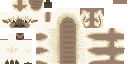
Sky Bison:  32x32 Texture


To make this guy work, start up Minecraft of your computer, hit play, and the main menu will show. Click "options > resource packs > open resource packs folder" buttons.

There you will pick the custom resource pack you want to add the sky bison in! (If you haven't had a custom pack before, you can choose one from one of my favorite sites, planetminecraft !)

Once you have picked your pack to edit, and you are in the resourcepacks folder, click *Texture Pack's Folder* > assets > mine craft > textures > entity > cow > *and replace that "cow.png" with this one, containing my version of Appa and family! Do make sure that the file name does not change, and if you have any questions, the planetminecraft link from above has wonderful help sections as well.

Thank you and I hope you enjoy!


*Of course, Minecraft is owned by Mojang and I do not take any credit for "Appa" or 'Nickelodeon's Avatar the Last Airbender' either. The rest of the world's textures in my Minecraft game I downloaded a long time ago from www.planetminecraft.com, DokuCraft Light. You can see the new versions of that texture pack and its creator by clicking here:  Doku Craft Link


Wednesday, April 6, 2016

Miss Bear Portrait: Project Process Art-Wednesday

Meet the sweet Miss Bear! A digital illustration completely done in photoshop, I thought it would be interesting to some of you to see a more in-depth look at my digital process! So below her portrait, you will find my three main stages that I use in my drawings. Thank you for looking!


1) To start, I do a number of warm up sketches in the size of thumbnails until I find one that match my vision. They are usually very rough and messy. Eventually I work up to a drawing I am happy with:
 

2) I refine my design on a separate layer above my sketch, getting clear edges and planning colors:


3) On another layer, sandwiched between the existing two, I start painting! On the right, you can see my color palette for the bear. I continue with this process until the whole canvas is painted. I add another layer on top for subtle warm and cool tones. The very last step before I am done is an extra pass to clean up edges!


Thank you for reading!